Free tool
STL Simplifier: Cut an STL to an Exact Triangle Count
This STL simplifier reduces the triangles in an STL or OBJ file to the number you choose, in your browser, and tells you how far the surface moved.
- Set an exact triangle count. Both models we cut to 50,000 stayed within 0.055 mm at 100 mm tall.
- Fewer triangles make a smaller file; a binary STL is 50 bytes per triangle.
- Open edges are counted after the cut, so you know if a repair is needed.
What an STL simplifier does to a figurine
Two Sculptly models, each scaled to 100 mm tall and cut down with the same code as the simplifier above. The first picture in each row is the original; the rest show every remaining triangle. Max deviation is how far the simplified surface moved from the original, as reported by the simplifier.
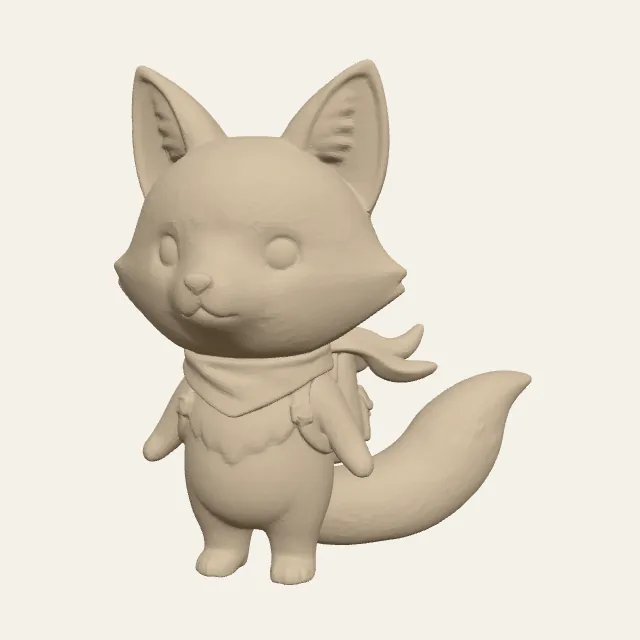
94,226 trianglesOriginal 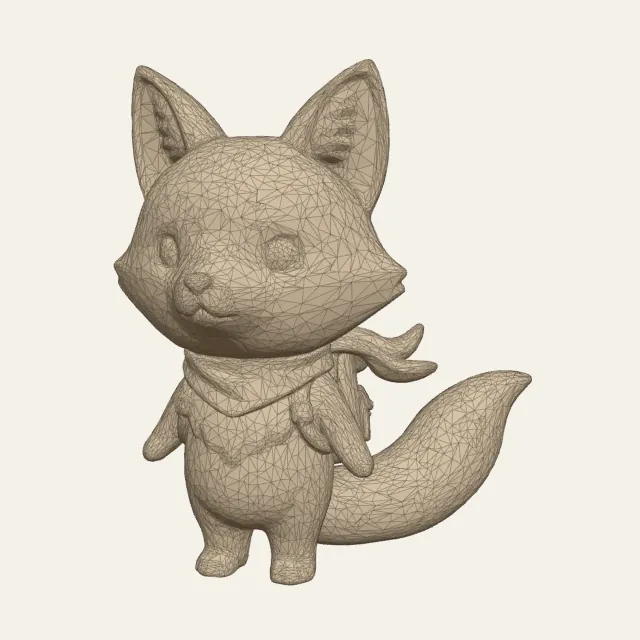
19,999 trianglesMax deviation 0.055 mm 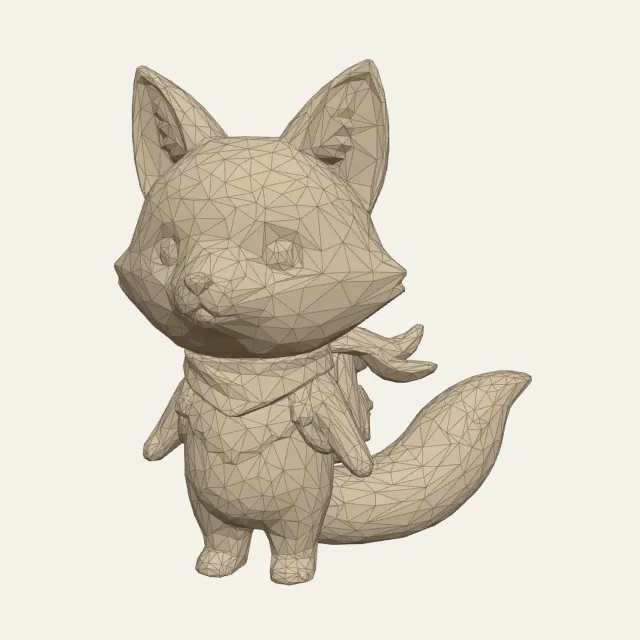
4,999 trianglesMax deviation 0.192 mm 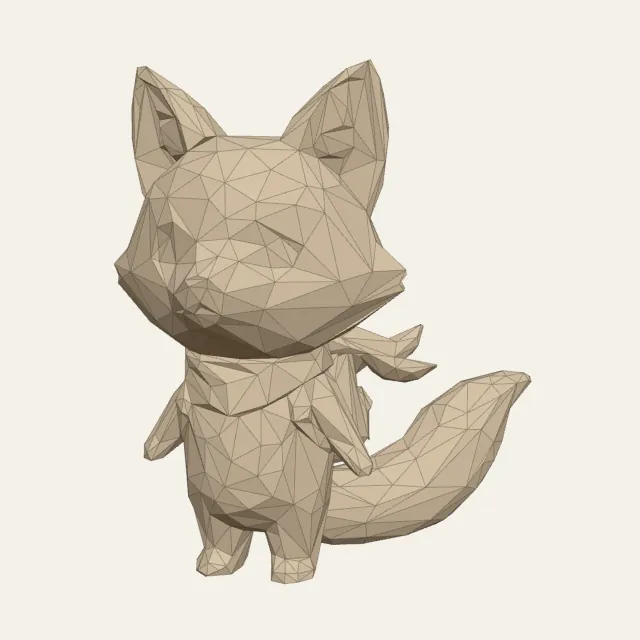
1,500 trianglesMax deviation 0.572 mm
How many triangles does a 3D print need?
AI and scan exports usually carry more triangles than a print needs. An FDM printer typically lays plastic in layers of about 0.2 mm, so a surface that moves by a few hundredths of a millimetre is a small fraction of one layer. In our runs on models 100 mm tall, both models we cut to 50,000 triangles (the bust and the fox) stayed within 0.055 mm, and all three we cut to 20,000 stayed within 0.13 mm. At 10,000 the qilin moved 0.234 mm, more than a 0.2 mm layer.
| Use | Triangle target | Why | Best for |
|---|---|---|---|
| Resin miniature | 100,000 to 200,000 | The bust moved 0.031 mm at 100,000. | Busts and faces |
| FDM figurine | 50,000 | The bust and the fox stayed within 0.055 mm. | Desk figures around 100 mm |
| Simple FDM object | 20,000 | The mug and chair moved 0.05 mm or less even at 10,000. | Props, holders, enclosures |
| Game or web asset | 2,500 to 10,000 | Fine detail is lost. | Engines with a per-mesh limit |
Bigger prints need more: the deviation scales with size, so the same 50,000 triangles on a 200 mm print should move roughly twice as far. For engineering parts with exact holes, simplify the CAD export instead.
STL simplifier, Blender Decimate or the slicer's own tool
Bambu Studio and OrcaSlicer have a Simplify model command on the right-click menu, and Blender has the Decimate modifier. Use this STL simplifier when you want an exact triangle count, and the deviation and open edge count reported after the cut. Decimate suits you better when you are already editing the model in Blender.
Measured: thirteen runs on six models
Times are from Node.js on our desktop on 2 October 2026, using the same simplifier build the page loads; a browser tab may be slower. The 500,000-triangle Ultra Detail bust was watertight before and came out with 2 to 10 open edges, which is why the STL simplifier counts them and warns when the number goes up.
| Model | Triangles | Max deviation | Open edges | Time |
|---|---|---|---|---|
| Ultra Detail bust | 500,000 to 200,000 | 0.017 mm | 0 to 2 | 503 ms |
| Ultra Detail bust | 500,000 to 100,000 | 0.031 mm | 0 to 3 | 476 ms |
| Ultra Detail bust | 500,000 to 50,000 | 0.055 mm | 0 to 4 | 451 ms |
| Ultra Detail bust | 500,000 to 20,000 | 0.127 mm | 0 to 10 | 421 ms |
| Ultra Detail bust | 500,000 to 10,000 | 0.239 mm | 0 to 10 | 518 ms |
| Fox figurine | 94,226 to 50,000 | 0.02 mm | 4 to 4 | 59 ms |
| Fox figurine | 94,226 to 20,000 | 0.055 mm | 4 to 4 | 49 ms |
| Fox figurine | 94,226 to 10,000 | 0.104 mm | 4 to 5 | 41 ms |
| Knight | 40,000 to 20,000 | 0.053 mm | 0 to 0 | 20 ms |
| Knight | 40,000 to 10,000 | 0.098 mm | 0 to 1 | 21 ms |
| Qilin | 26,606 to 10,000 | 0.234 mm | 1 to 5 | 8 ms |
| Chair | 16,372 to 10,000 | 0.026 mm | 0 to 0 | 7 ms |
| Mug | 14,774 to 10,000 | 0.05 mm | 0 to 0 | 4 ms |
Questions about simplifying STL files
How do I simplify an STL file?
Drop the STL on the simplifier above, pick how many triangles you want to keep (50k suits most figurines around 100 mm), choose STL or 3MF, and press Simplify. The file is processed in your browser with an edge-collapse simplifier, and the result shows the triangle count, file size, the largest surface deviation and the open edge count before and after. Download the new file when the numbers look right.
How many triangles should an STL have for 3D printing?
For an FDM print around 100 mm tall, 20,000 to 50,000 triangles kept the three models we measured at 20,000 within 0.13 mm of the original, less than a typical 0.2 mm layer. Resin prints show more, so keep 100,000 or more for faces and miniatures. A slicer copes with millions, but files that big are slow to slice and send.
How do I reduce STL file size?
Two ways that stack. A binary STL takes 50 bytes per triangle, so cutting triangles cuts the size in proportion: 500,000 triangles is 25 MB and 50,000 is 2.5 MB. Then saving as 3MF instead of STL compresses the same mesh to about a quarter of the STL in our tests. If you need STL specifically, only the first one applies.
Does simplifying an STL change its size or scale?
No. The outer dimensions stay the same and the units stay whatever the file used. What changes is how many flat triangles describe the surface, so curved areas become slightly faceted and fine details such as engraved text can soften. The result panel shows the largest deviation in the file's units and as a percentage of the model's longest side so you can judge it.
Why does my slicer report errors after simplifying?
Collapsing edges can occasionally open small gaps. In our measurements a watertight 500,000-triangle bust came out with 2 open edges at 200,000 triangles and 10 at 20,000. The simplifier counts open edges before and after, and when the number goes up it warns you. Some slicers repair small gaps on import, so check yours.
Is the STL simplifier free, and are my files uploaded?
It is free with no account, and nothing is uploaded: the simplifier is a WebAssembly build of meshoptimizer running in a Web Worker in your own browser tab. Very large files are limited by your device memory; a 2,000,000-triangle STL can need several hundred megabytes of free memory.
Related tools
Cut the file to about a quarter of the STL size without losing a triangle.
Look at a GLB and its textures before you simplify it.
Start from a photo and get a print-ready STL.