Meshy vs Tripo vs Sculptly: what a 3D model really costs, and what you can print
We read the pricing pages and the logged-in apps of all three, most of it on October 7, 2026, and priced every action in dollars. Each row shows its own date. We make Sculptly, so we are not neutral, and we say where it is the expensive one, too.
Last updated . Each table lists the source and date of every row.
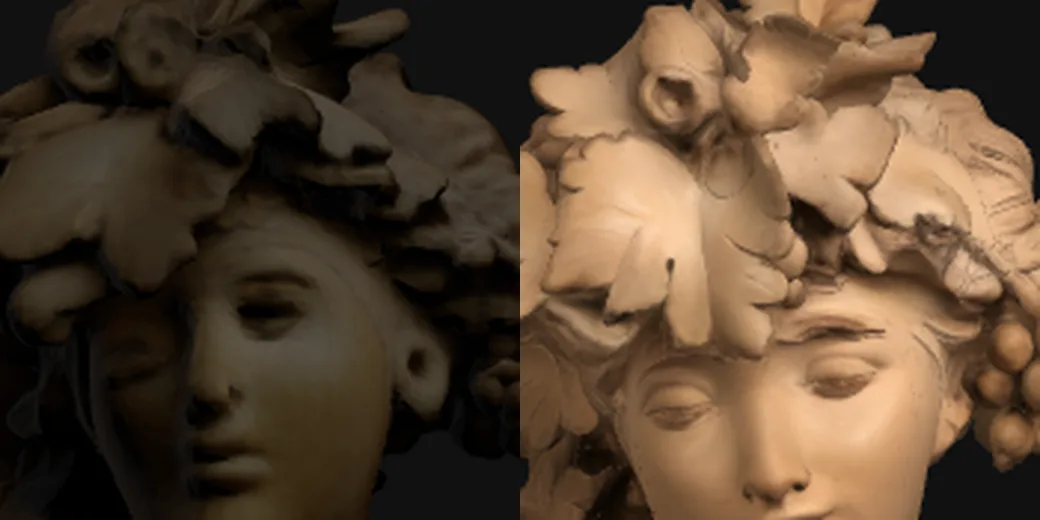
Our own render: Sculptly Standard (left) and Ultra Detail (right) from one photograph. We did not generate this photo on Meshy or Tripo.
Meshy vs Tripo vs Sculptly: which should you pick?
Pick Meshy if you print a lot
You want a printability check, one-click repair, auto split, multi-colour export and send to slicer inside one subscription, and you are happy to pay monthly. On its free plan: CC BY 4.0, so credit Meshy when you publish, and 10 downloads a month, Lite model only.
Less fit if you only need one or two files: a standard textured model is about $0.60 of Pro credits.
Pick Tripo for the cheapest credits
You want the lowest price per credit, plugins for Blender, 3ds Max, Unity, Unreal, Maya, Cocos, Godot and ZBrush, and a rigging and segmentation toolbox. A standard textured model is about $0.17 on Pro.
Less fit if you need private or commercial models on a free account: its free plan is public and non-commercial, and print repair was not shown in the app we read.
Pick Sculptly to print from a photo
You turn photos into printable models, want to pay per model or per pack instead of a subscription, and want the file rebuilt as one closed solid before you pay. A standard model is 3 credits, about $0.13 to $0.18.
Less fit if you need High Detail often (36 credits, about $1.58 to $2.16, the dearest on this page), a native text-to-3D model, or Blender and Unity plugins.
What does one 3D model cost on Meshy, Tripo and Sculptly?
Credits are not comparable across products, so we priced one thing the same way everywhere: a plan’s price per credit, times what the product charges for the action. On that basis a standard textured model is $0.60 on Meshy Pro, $0.17 on Tripo Pro and $0.13 to $0.18 on Sculptly.
Standard model. Cost of one standard textured model, in dollars. Read 2026-10-07; plan price ÷ plan credits × action credits.
Meshy Pro$0.60
Tripo Pro$0.17
Sculptly (Ultra plan)$0.13
Sculptly (Starter Pack)$0.18
Priced the same way for all three, a standard textured model is about $0.60 on Meshy Pro, $0.17 on Tripo Pro and $0.13 to $0.18 on Sculptly, while Sculptly's High Detail is the dearest line on the page.
What a credit and a model cost: Meshy, Tripo and Sculptly
What you care about
Meshy
Tripo
Sculptly
What a credit costs
Cheapest paid plan
Pro $20/mo, 1,000 credits
Pro $20/mo, 3,000 credits
Lite $8/mo, 165 credits; Starter $19/mo, 400 credits
Price of one credit
$0.020 on Pro
$0.0067 on Pro
$0.044 on the Ultra plan to $0.060 on the Starter Pack
Price of one credit on the biggest plan
$0.0125 ($100/mo, 8,000 credits)
$0.0036 ($90/mo, 25,000 credits)
$0.044 ($99/mo, 2,250 credits)
What one model costs
One standard textured model
30 credits, about $0.60
25 credits, about $0.17
3 credits, about $0.13 to $0.18
The same model on the biggest plan
about $0.38
about $0.09
about $0.13
Highest-detail textured model
Ultra mode for subscribers; its credit cost was not read
50 credits (Ultra Mesh), about $0.33
36 credits for High Detail, about $1.58 to $2.16
How far a month goes
Standard textured models a month on the cheapest plan
33 (1,000 credits ÷ 30)
120 (3,000 credits ÷ 25)
55 on Lite, 133 on Starter
Intro offer
New accounts: 50% off the first month on monthly plans
New accounts: 50% off the first month
Starter first month $9 for new accounts within 48 hours of sign-up
Dollars are plan price divided by plan credits, times the credits an action costs. Meshy was read through an AUD storefront; credits do not change with currency, so its dollars are recomputed from the USD list price. Tripo’s USD list price is used, not its logged-in yearly view. Prices change by region and promotion.
Sources and dates for this table
Cheapest paid plan: 2026-10-07, meshy.ai/pricing (USD list price, Pro, monthly.)
Cheapest paid plan: 2026-10-07, meshy.ai/pricing (Credits per month on Pro.)
Cheapest paid plan: 2026-10-07, tripo3d.ai/pricing (USD list price, Pro. A logged-in view showed $13 a month billed yearly; we use the list price.)
Cheapest paid plan: 2026-10-07, tripo3d.ai/pricing (Credits per month on Pro.)
Cheapest paid plan: 2026-10-07, Sculptly pricing, refund and licence pages
Cheapest paid plan: 2026-10-07, Sculptly pricing, refund and licence pages
Cheapest paid plan: 2026-10-07, Sculptly pricing, refund and licence pages
Cheapest paid plan: 2026-10-07, Sculptly pricing, refund and licence pages
Price of one credit: 2026-10-07, meshy.ai/pricing (USD list price, Pro, monthly.)
Price of one credit: 2026-10-07, meshy.ai/pricing (Credits per month on Pro.)
Price of one credit: 2026-10-07, tripo3d.ai/pricing (USD list price, Pro. A logged-in view showed $13 a month billed yearly; we use the list price.)
Price of one credit: 2026-10-07, tripo3d.ai/pricing (Credits per month on Pro.)
Price of one credit: 2026-10-07, Sculptly pricing, refund and licence pages
Price of one credit: 2026-10-07, Sculptly pricing, refund and licence pages
Price of one credit: 2026-10-07, Sculptly pricing, refund and licence pages
Price of one credit: 2026-10-07, Sculptly pricing, refund and licence pages
Price of one credit on the biggest plan: 2026-09-27, meshy.ai/pricing (Ultra plan, USD list price.)
Price of one credit on the biggest plan: 2026-09-27, meshy.ai/pricing (Credits per month on the Ultra plan.)
Price of one credit on the biggest plan: 2026-09-27, tripo3d.ai/pricing (Max plan, USD list price.)
Price of one credit on the biggest plan: 2026-09-27, tripo3d.ai/pricing (Credits per month on Max.)
Price of one credit on the biggest plan: 2026-10-07, Sculptly pricing, refund and licence pages
Price of one credit on the biggest plan: 2026-10-07, Sculptly pricing, refund and licence pages
One standard textured model: 2026-10-07, meshy.ai/pricing (Credits read in the logged-in free web app on 2026-10-07. The storefront showed AUD; credits do not change with currency.)
One standard textured model: 2026-10-07, tripo3d.ai/pricing (Credit costs read in the logged-in free web app on 2026-10-07.)
One standard textured model: 2026-10-07, Sculptly pricing, refund and licence pages
The same model on the biggest plan: 2026-09-27, meshy.ai/pricing (Ultra plan, USD list price.)
The same model on the biggest plan: 2026-09-27, tripo3d.ai/pricing (Max plan, USD list price.)
The same model on the biggest plan: 2026-10-07, Sculptly pricing, refund and licence pages
The same model on the biggest plan: 2026-10-07, meshy.ai/pricing (Credits read in the logged-in free web app on 2026-10-07. The storefront showed AUD; credits do not change with currency.)
Highest-detail textured model: 2026-10-07, meshy.ai/pricing (Credits read in the logged-in free web app on 2026-10-07. The storefront showed AUD; credits do not change with currency.)
Highest-detail textured model: 2026-10-07, tripo3d.ai/pricing (Credit costs read in the logged-in free web app on 2026-10-07.)
Highest-detail textured model: 2026-10-07, Sculptly pricing, refund and licence pages
Standard textured models a month on the cheapest plan: 2026-10-07, meshy.ai/pricing (Credits per month on Pro.)
Standard textured models a month on the cheapest plan: 2026-10-07, meshy.ai/pricing (Credits read in the logged-in free web app on 2026-10-07. The storefront showed AUD; credits do not change with currency.)
Standard textured models a month on the cheapest plan: 2026-10-07, tripo3d.ai/pricing (Credits per month on Pro.)
Standard textured models a month on the cheapest plan: 2026-10-07, tripo3d.ai/pricing (Credit costs read in the logged-in free web app on 2026-10-07.)
Standard textured models a month on the cheapest plan: 2026-10-07, Sculptly pricing, refund and licence pages
Standard textured models a month on the cheapest plan: 2026-10-07, Sculptly pricing, refund and licence pages
Intro offer: 2026-10-07, Sculptly pricing, refund and licence pages
High Detail is where we are the expensive one. It costs 36 credits, about $1.58 to $2.16, against about $0.33 for Tripo’s top textured mode. If you need many high-detail models a month, Tripo’s credits go further than ours.
Highest detail. Cost of one highest-detail textured model, in dollars. Meshy’s Ultra mode credit cost was not read, so it is not charted.
Tripo Ultra Mesh$0.33
Sculptly High Detail (Ultra plan)$1.58
Sculptly High Detail (Starter Pack)$2.16
Credits per action, side by side
On the same formula Sculptly is level with Tripo and well under Meshy for a standard model, and its subscriber tools cost 1 to 5 credits where they charge 5 to 40, but High Detail, Ultra Detail and retexture are dearer here than there.
Credits per action: Meshy, Tripo and Sculptly
What you care about
Meshy
Tripo
Sculptly
Making the model
Standard textured model
30 credits (about $0.60)
25 credits at 2K, 35 at 4K (about $0.17)
3 credits (about $0.13 to $0.18)
Untextured model
20 credits
15 credits (HD)
Not offered: every Sculptly model is textured
Highest-detail textured model
Ultra mode, subscribers only; its credit cost was not read
Ultra Mesh textured, 50 credits (about $0.33)
High Detail 36 credits (about $1.58 to $2.16); Ultra Detail 48 credits (about $2.11 to $2.88)
Editing it
Retexture
10 credits (about $0.20)
10 credits at 2K, 20 at 4K (about $0.07)
10 credits for subscribers (about $0.44 to $0.48)
Retopology
Smart Topology 5 credits
5 credits for triangles, 10 for quads
3 credits for subscribers (about $0.13 to $0.15)
Print prep
Auto split into parts
10 credits, subscribers
Segment, 40 credits
3 credits, subscribers
Split and colour for printing
Multi-colour print 16 credits
Multi-colour printable export; credit cost not shown
Split 3 plus colour export 5 credits, subscribers
Printability repair
10 credits
Not shown in the app we read
No credits: the paid export rebuilds the model as one closed solid
Hollow and orient for the bed
Not shown in the app we read
Not shown in the app we read
Hollow 2 credits; orient 1 credit; subscribers
Characters
Rig a character
0 credits in the web app
20 credits
10 credits; humanoid characters only, with walk and run clips
Animate
Text-to-motion 3 credits
20 credits
Walk and run clips come with the rig
Competitor credits as read on the dates in the sources list. Our workbench tools are for subscribers and are being switched on gradually, so availability can differ from the price set in code.
Sources and dates for this table
Standard textured model: 2026-10-07, meshy.ai/pricing (Credits read in the logged-in free web app on 2026-10-07. The storefront showed AUD; credits do not change with currency.)
Standard textured model: 2026-10-07, tripo3d.ai/pricing (Credit costs read in the logged-in free web app on 2026-10-07.)
Standard textured model: 2026-10-07, tripo3d.ai/pricing (Credit costs read in the logged-in free web app on 2026-10-07.)
Standard textured model: 2026-10-07, Sculptly pricing, refund and licence pages
Untextured model: 2026-10-07, meshy.ai/pricing (Credits read in the logged-in free web app on 2026-10-07. The storefront showed AUD; credits do not change with currency.)
Untextured model: 2026-10-07, tripo3d.ai/pricing (Credit costs read in the logged-in free web app on 2026-10-07.)
Untextured model: 2026-10-07, Sculptly pricing, refund and licence pages
Highest-detail textured model: 2026-10-07, meshy.ai/pricing (Credits read in the logged-in free web app on 2026-10-07. The storefront showed AUD; credits do not change with currency.)
Highest-detail textured model: 2026-10-07, tripo3d.ai/pricing (Credit costs read in the logged-in free web app on 2026-10-07.)
Highest-detail textured model: 2026-10-07, Sculptly pricing, refund and licence pages
Highest-detail textured model: 2026-10-07, Sculptly pricing, refund and licence pages
Retexture: 2026-10-07, meshy.ai/pricing (Credits read in the logged-in free web app on 2026-10-07. The storefront showed AUD; credits do not change with currency.)
Retexture: 2026-10-07, tripo3d.ai/pricing (Credit costs read in the logged-in free web app on 2026-10-07.)
Retexture: 2026-10-07, tripo3d.ai/pricing (Credit costs read in the logged-in free web app on 2026-10-07.)
Retexture: 2026-10-07, Sculptly pricing, refund and licence pages
Retopology: 2026-10-07, meshy.ai/pricing (Credits read in the logged-in free web app on 2026-10-07. The storefront showed AUD; credits do not change with currency.)
Retopology: 2026-10-07, tripo3d.ai/pricing (Credit costs read in the logged-in free web app on 2026-10-07.)
Retopology: 2026-10-07, tripo3d.ai/pricing (Credit costs read in the logged-in free web app on 2026-10-07.)
Retopology: 2026-10-07, Sculptly pricing, refund and licence pages
Auto split into parts: 2026-10-07, meshy.ai/pricing (Credits read in the logged-in free web app on 2026-10-07. The storefront showed AUD; credits do not change with currency.)
Auto split into parts: 2026-10-07, tripo3d.ai/pricing (Credit costs read in the logged-in free web app on 2026-10-07.)
Auto split into parts: 2026-10-07, Sculptly pricing, refund and licence pages
Split and colour for printing: 2026-10-07, meshy.ai/pricing (Credits read in the logged-in free web app on 2026-10-07. The storefront showed AUD; credits do not change with currency.)
Split and colour for printing: 2026-10-07, tripo3d.ai/pricing (Credit costs read in the logged-in free web app on 2026-10-07.)
Split and colour for printing: 2026-10-07, Sculptly pricing, refund and licence pages
Split and colour for printing: 2026-10-07, Sculptly pricing, refund and licence pages
Printability repair: 2026-10-07, meshy.ai/pricing (Credits read in the logged-in free web app on 2026-10-07. The storefront showed AUD; credits do not change with currency.)
Printability repair: 2026-10-07, tripo3d.ai/pricing (Credit costs read in the logged-in free web app on 2026-10-07.)
Printability repair: 2026-10-07, Sculptly pricing, refund and licence pages
Hollow and orient for the bed: 2026-10-07, meshy.ai/pricing (Credits read in the logged-in free web app on 2026-10-07. The storefront showed AUD; credits do not change with currency.)
Hollow and orient for the bed: 2026-10-07, tripo3d.ai/pricing (Credit costs read in the logged-in free web app on 2026-10-07.)
Hollow and orient for the bed: 2026-10-07, Sculptly pricing, refund and licence pages
Hollow and orient for the bed: 2026-10-07, Sculptly pricing, refund and licence pages
Rig a character: 2026-10-07, meshy.ai/pricing (Credits read in the logged-in free web app on 2026-10-07. The storefront showed AUD; credits do not change with currency.)
Rig a character: 2026-10-07, tripo3d.ai/pricing (Credit costs read in the logged-in free web app on 2026-10-07.)
Rig a character: 2026-10-07, Sculptly pricing, refund and licence pages
Rig a character: 2026-10-07, Sculptly pricing, refund and licence pages
Animate: 2026-10-07, meshy.ai/pricing (Credits read in the logged-in free web app on 2026-10-07. The storefront showed AUD; credits do not change with currency.)
Animate: 2026-10-07, tripo3d.ai/pricing (Credit costs read in the logged-in free web app on 2026-10-07.)
Animate: 2026-10-07, Sculptly pricing, refund and licence pages
Where Sculptly is cheaper is the small stuff: its subscriber workbench tools are priced at 1 to 5 credits, and a one-off credit pack never expires.
All three at a glance
Meshy has the most print tools inside one subscription, Tripo has the cheapest credits and the plugins, and Sculptly is level with Tripo for a standard model from a photo, with one-off packs that never expire.
Meshy, Tripo and Sculptly at a glance
What you care about
Meshy
Tripo
Sculptly
Start free
Free credits
100 credits a month
200 credits a month (Tripo: about 13 models)
3 credits at sign-up plus 3 the next day, and one model with no account where the free tier is offered
What you can download free
10 downloads a month, Lite model only
15 exports, H2.5 model only
GLB with a free account; OBJ, FBX, STL and 3MF are a paid export
Commercial use on the free plan
✓ CC BY 4.0, so credit Meshy when you publish (yes)
✗ Public models, non-commercial use (no)
✓ With credit to Sculptly until the account has ever paid (yes)
What a model costs
One standard textured model
30 credits, about $0.60
25 credits, about $0.17
3 credits, about $0.13 to $0.18
Highest-detail textured model
Credit cost not read
50 credits, about $0.33
36 credits, about $1.58 to $2.16 (the dearest line here)
Credits that never expire
Credit packs exist and bought credits do not expire, but a pack alone does not unlock downloads
Credit packs sold ($10 for 1,000 credits); expiry not stated
Credit packs never expire: $9 for 150, $15 for 300, $40 for 800 credits
Printing
Check it will print
Printability check that flags holes and non-manifold edges
Not shown in the app we read
A free report before you pay: size in millimetres, triangle count, whether a slicer sees one solid, and a print-time estimate
Repair it
One-click repair, 10 credits
Not shown in the app we read
Rebuilt as one closed solid inside the paid export
Split and colour
Auto split 10, multi-colour 16 credits
Segment 40 credits; multi-colour export, cost not shown
Split 3 plus colour export 5 credits, subscribers
Export and rights
A print file costs
Part of a subscription; Free is 10 Lite downloads a month
Free is capped at 15 exports; Pro lists unlimited
$1.90 a model, or $3 for every model on the account
Licence once you pay
✓ Private, customer-owned assets on paid plans (yes)
✓ Private models and commercial use on paid plans (yes)
✓ After any purchase: no attribution, on every model on your account — including the ones you already made. (yes)
Plugins for other software
Plugins for Bambu Studio, Creality Print, OrcaSlicer, Cura, Elegoo and Lychee
Commercial use on the free plan: 2026-10-07, Sculptly pricing, refund and licence pages
One standard textured model: 2026-10-07, meshy.ai/pricing (Credits read in the logged-in free web app on 2026-10-07. The storefront showed AUD; credits do not change with currency.)
One standard textured model: 2026-10-07, tripo3d.ai/pricing (Credit costs read in the logged-in free web app on 2026-10-07.)
One standard textured model: 2026-10-07, Sculptly pricing, refund and licence pages
Highest-detail textured model: 2026-10-07, meshy.ai/pricing (Credits read in the logged-in free web app on 2026-10-07. The storefront showed AUD; credits do not change with currency.)
Highest-detail textured model: 2026-10-07, tripo3d.ai/pricing (Credit costs read in the logged-in free web app on 2026-10-07.)
Highest-detail textured model: 2026-10-07, Sculptly pricing, refund and licence pages
Credits that never expire: 2026-10-07, Sculptly pricing, refund and licence pages
Credits that never expire: 2026-10-07, Sculptly pricing, refund and licence pages
Credits that never expire: 2026-10-07, Sculptly pricing, refund and licence pages
Credits that never expire: 2026-10-07, Sculptly pricing, refund and licence pages
Check it will print: 2026-10-07, meshy.ai/pricing (Credits read in the logged-in free web app on 2026-10-07. The storefront showed AUD; credits do not change with currency.)
Check it will print: 2026-10-07, tripo3d.ai/pricing (Credit costs read in the logged-in free web app on 2026-10-07.)
Check it will print: 2026-10-07, Sculptly pricing, refund and licence pages
Repair it: 2026-10-07, meshy.ai/pricing (Credits read in the logged-in free web app on 2026-10-07. The storefront showed AUD; credits do not change with currency.)
Repair it: 2026-10-07, tripo3d.ai/pricing (Credit costs read in the logged-in free web app on 2026-10-07.)
Repair it: 2026-10-07, Sculptly pricing, refund and licence pages
Split and colour: 2026-10-07, meshy.ai/pricing (Credits read in the logged-in free web app on 2026-10-07. The storefront showed AUD; credits do not change with currency.)
Split and colour: 2026-10-07, meshy.ai/pricing (Credits read in the logged-in free web app on 2026-10-07. The storefront showed AUD; credits do not change with currency.)
Split and colour: 2026-10-07, tripo3d.ai/pricing (Credit costs read in the logged-in free web app on 2026-10-07.)
Split and colour: 2026-10-07, tripo3d.ai/pricing (Credit costs read in the logged-in free web app on 2026-10-07.)
Split and colour: 2026-10-07, Sculptly pricing, refund and licence pages
Split and colour: 2026-10-07, Sculptly pricing, refund and licence pages
Meshy vs Tripo vs Sculptly for 3D printing: which steps cost what?
A model that looks right can still fail in a slicer. This is the path from a picture to a print, with what each product shows at each step.
1Generate
Meshy
30 cr
Tripo
25 cr
Sculptly
3 cr
2Check it prints
Meshy
Printability check
Tripo
Not shown
Sculptly
Free report
3Repair
Meshy
10 cr
Tripo
Not shown
Sculptly
In the export
4Split
Meshy
10 cr
Tripo
40 cr
Sculptly
3 cr
5Colour
Meshy
16 cr
Tripo
Cost not shown
Sculptly
5 cr
6To the slicer
Meshy
Send button
Tripo
Send to Bambu
Sculptly
Download file
cr = credits. Greyed text means the step was not shown in the app we read, which is not the same as the product lacking it.
Meshy bundles the most print steps into a subscription, Tripo shows multi-colour export and a Bambu hand-off, and Sculptly repairs inside the paid export and refunds that export if it will not slice.
3D printing step by step: Meshy, Tripo and Sculptly
What you care about
Meshy
Tripo
Sculptly
From picture to slicer
1. Get a mesh
Generate, 30 credits textured
Generate, 25 credits textured
Generate, 3 credits
2. Check it is watertight
Printability check that flags holes and non-manifold edges
Not shown in the app we read
A free report before you pay: size in millimetres, triangle count, whether a slicer sees one solid, and a print-time estimate
3. Repair it
One-click repair, 10 credits
Not shown in the app we read
A paid STL, OBJ or 3MF is rebuilt as one closed solid within 1% of your shape, or you get your own geometry back and are told
4. Set size and base
Add Base
Not shown in the app we read
Set the printed height in millimetres, with an optional flat base
5. Split a big model
Auto split, 10 credits, subscribers
Segment, 40 credits
Auto split, 3 credits, subscribers
6. Colour it
Multi-colour print, 16 credits
Multi-colour printable export; credit not shown
Colour export 5 credits after the split, subscribers
7. Send to the slicer
Send to slicer (Bambu Studio and others), subscribers only
Send to Bambu from the 3D Print menu
Download the STL or 3MF and open it in your slicer; there is no send button
8. If it will not slice
Its terms say it generally does not refund; exceptions are handled case by case by email
Only for accidental purchases requested within 24 hours with no credits used, or when the service misses its published terms
If a paid STL, OBJ or 3MF will not slice, email within 30 days of buying it and that export is refunded in full
Sources and dates for this table
1. Get a mesh: 2026-10-07, meshy.ai/pricing (Credits read in the logged-in free web app on 2026-10-07. The storefront showed AUD; credits do not change with currency.)
1. Get a mesh: 2026-10-07, tripo3d.ai/pricing (Credit costs read in the logged-in free web app on 2026-10-07.)
1. Get a mesh: 2026-10-07, Sculptly pricing, refund and licence pages
2. Check it is watertight: 2026-10-07, meshy.ai/pricing (Credits read in the logged-in free web app on 2026-10-07. The storefront showed AUD; credits do not change with currency.)
2. Check it is watertight: 2026-10-07, tripo3d.ai/pricing (Credit costs read in the logged-in free web app on 2026-10-07.)
2. Check it is watertight: 2026-10-07, Sculptly pricing, refund and licence pages
3. Repair it: 2026-10-07, meshy.ai/pricing (Credits read in the logged-in free web app on 2026-10-07. The storefront showed AUD; credits do not change with currency.)
3. Repair it: 2026-10-07, tripo3d.ai/pricing (Credit costs read in the logged-in free web app on 2026-10-07.)
3. Repair it: 2026-10-07, Sculptly pricing, refund and licence pages
4. Set size and base: 2026-10-07, meshy.ai/pricing (Credits read in the logged-in free web app on 2026-10-07. The storefront showed AUD; credits do not change with currency.)
4. Set size and base: 2026-10-07, tripo3d.ai/pricing (Credit costs read in the logged-in free web app on 2026-10-07.)
4. Set size and base: 2026-10-07, Sculptly pricing, refund and licence pages
5. Split a big model: 2026-10-07, meshy.ai/pricing (Credits read in the logged-in free web app on 2026-10-07. The storefront showed AUD; credits do not change with currency.)
5. Split a big model: 2026-10-07, tripo3d.ai/pricing (Credit costs read in the logged-in free web app on 2026-10-07.)
5. Split a big model: 2026-10-07, Sculptly pricing, refund and licence pages
6. Colour it: 2026-10-07, meshy.ai/pricing (Credits read in the logged-in free web app on 2026-10-07. The storefront showed AUD; credits do not change with currency.)
6. Colour it: 2026-10-07, tripo3d.ai/pricing (Credit costs read in the logged-in free web app on 2026-10-07.)
6. Colour it: 2026-10-07, Sculptly pricing, refund and licence pages
7. Send to the slicer: 2026-10-07, meshy.ai/pricing (Credits read in the logged-in free web app on 2026-10-07. The storefront showed AUD; credits do not change with currency.)
7. Send to the slicer: 2026-10-07, tripo3d.ai/pricing (Credit costs read in the logged-in free web app on 2026-10-07.)
7. Send to the slicer: 2026-10-07, Sculptly pricing, refund and licence pages
8. If it will not slice: 2026-10-07, Sculptly pricing, refund and licence pages
How good are the results, and what can we not show?
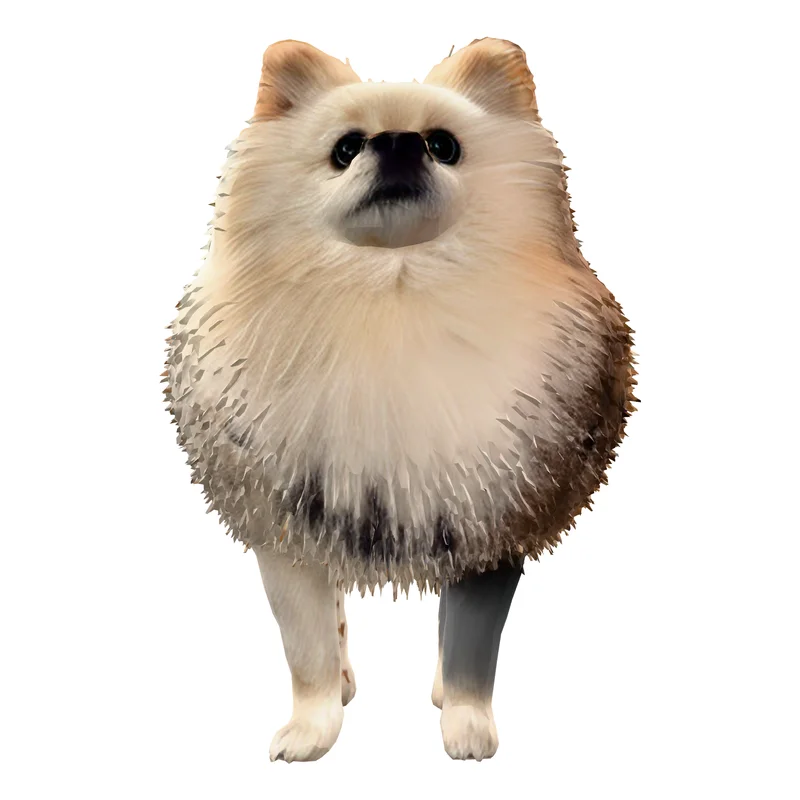
We show only our own renders. We did not generate the same photo on Meshy or Tripo for this page, so their own galleries are the fair place to judge their quality. For Sculptly, here is one photo at all three settings.
PhotoA pet photo
Standard3 credits · 40,000 faces
High Detail36 credits · 93,000 facesBest for this photo
Ultra Detail48 credits · 500,000 faces
High Detail keeps the face: eyes, nose and mouth where the photo has them. Standard flattens it and paints the muzzle on. Ultra Detail gives a clean, smooth figurine that prints well but loses the fur.
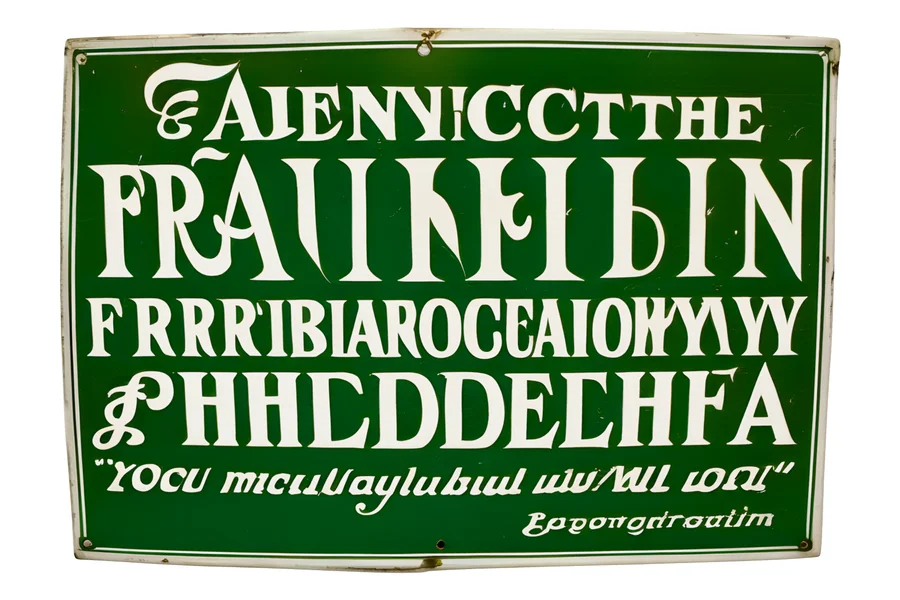
PhotoA sign with lettering
Standard3 credits · 40,000 faces
High Detail36 credits · 100,000 facesBest for this photo
Ultra Detail48 credits · 500,000 faces
High Detail keeps every line readable, down to the small quote. Standard keeps the big words and repaints the small ones. Ultra Detail scrambles the lettering, so do not use it for text.
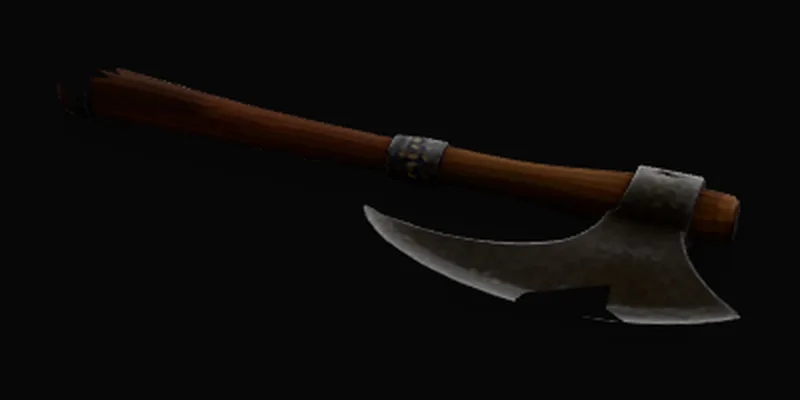
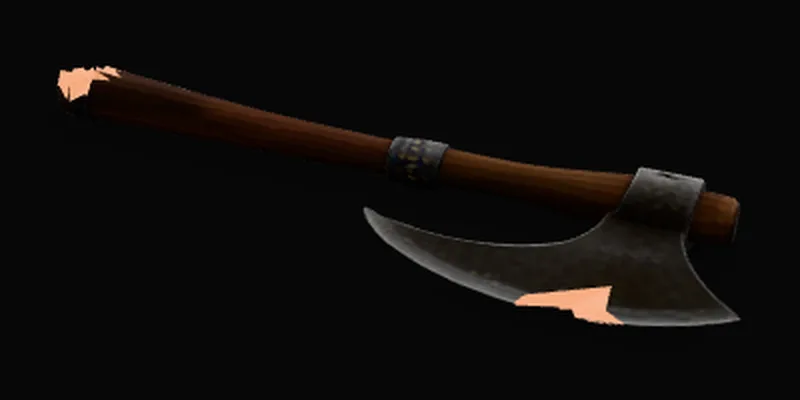
Before: you can see through the blade and into the handle.After our free hole-capping repair: both holes closed, the orange is the new triangles. The paid export goes further and rebuilds the whole model as one closed solid.
Export, licence and refunds: Meshy vs Tripo vs Sculptly
The three differ most on what a free account may do commercially, whether a print file costs extra, and how refunds work, so the rows below quote each term with the date it was read.
Export, licence, credits and refunds: Meshy, Tripo and Sculptly
What you care about
Meshy
Tripo
Sculptly
Export
File formats
FBX, OBJ, GLB, USDZ, STL, BLEND, 3MF and DXF listed
STL, OBJ, FBX, GLB, USD and 3MF
GLB free with an account; OBJ, FBX, STL and 3MF as a paid export
On a free account
10 downloads a month, Lite model only
15 exports, H2.5 model only
GLB download with a free account; the other formats are paid
Extra fee for a print file
✗ No separate fee; downloads are a subscription feature (no)
✗ No separate fee; Pro lists unlimited exports (no)
✓ $1.90 a model, or $3 for the whole account (yes)
Licence and commercial use
Free plan
CC BY 4.0, so credit Meshy when you publish
Public models, non-commercial use
Commercial use with credit to Sculptly until the account has ever paid
Paid
Private, customer-owned assets on paid plans
Private models and commercial use on paid plans
Any purchase: no attribution, on every model on your account — including the ones you already made.
Credits and refunds
Do credits expire
Monthly plan credits reset each month
Monthly credits do not roll over
Credit packs never expire; subscription credit terms are on our pricing page
Refunds
Its terms say it generally does not refund; exceptions are handled case by case by email
Only for accidental purchases requested within 24 hours with no credits used, or when the service misses its published terms
Failed generations are refunded automatically; unused credits from a pack within 30 days of buying; unused subscription credits pro rata within 30 days of cancelling
Sculptly export prices are the standard shelf prices; a signed-in account can be shown a different export offer during a price test, and the price at checkout is the one that applies.
Refunds: 2026-10-07, Sculptly pricing, refund and licence pages
What do you keep from a free account?
All three give you something free. The difference is what you can do with it.
Meshy: 100 credits a month. 10 downloads a month, Lite model only. CC BY 4.0, so credit Meshy when you publish.
Tripo: 200 credits a month. 15 exports, H2.5 model only. Public models, non-commercial use.
Sculptly: 3 credits at sign-up plus 3 the next day, and one model with no account where the free tier is offered. GLB download with a free account; OBJ, FBX, STL and 3MF cost $1.90 a model. Commercial use with credit to Sculptly until the account has ever paid.
Meshy vs Tripo vs Sculptly: frequently asked questions
Is Sculptly cheaper than Meshy or Tripo for 3D printing?
For a standard model, yes against Meshy and about level with Tripo: $0.13 to $0.18 on Sculptly, $0.60 on Meshy Pro and $0.17 on Tripo Pro. For High Detail we are dearer, $1.58 to $2.16 against $0.33 for Tripo’s top mode. A print file adds $1.90 on Sculptly.
Print prep is where the three differ. Meshy charges 10 credits to repair, 10 credits to split and 16 credits for multi-colour. Tripo charges 40 credits to segment, and its repair step was not shown in the app we read. Sculptly rebuilds the model as one closed solid inside the $1.90 export ($3 covers every model on the account), and subscribers pay 1 credit (about $0.04 to $0.05) to 5 credits (about $0.22 to $0.24) for its workbench tools.
Tripo is cheaper per model at the entry level. Both charge $20 a month for Pro, but Tripo gives 3,000 credits against Meshy’s 1,000, so a standard textured model is about $0.17 on Tripo and $0.60 on Meshy. The difference is credits, not list price.
That is 120 standard textured models a month on Tripo Pro against 33 on Meshy Pro. The gap narrows on bigger plans: Meshy’s $100 Ultra plan brings the same model to about $0.38, and Tripo’s $90 Max plan to about $0.09.
What does each free plan include, and can I use free models commercially?
Meshy’s free plan gives 100 credits a month under CC BY 4.0, so commercial use needs a credit line. Tripo’s 200 free credits make public, non-commercial models. Sculptly’s free credits allow commercial use with credit to Sculptly until the account has paid once.
Downloads differ too: Meshy’s free plan allows 10 downloads a month, Lite model only, Tripo’s 15 exports, H2.5 model only, and Sculptly gives 3 credits at sign-up plus 3 the next day, a GLB download with a free account, and one model with no account where the free tier is offered. Any purchase on Sculptly removes the credit requirement from every model on the account, including earlier ones.
How many credits does each action cost on Meshy, Tripo and Sculptly?
A standard textured model costs 30 credits on Meshy, 25 on Tripo and 3 on Sculptly. Splitting costs 10, 40 and 3. Retexturing costs 10, 10 and 10. Rigging costs 0 in Meshy’s web app, 20 and 10. Credits differ in value, so the tables convert each action to dollars.
The actions table above lists every action, with its dollar figure at each product’s entry plan: plan price divided by plan credits, times the credits the action costs. Sculptly’s retopology costs 3 credits, hollow 2 credits and orient 1 credit for subscribers; Meshy’s Smart Topology costs 5 credits and Tripo’s retopology 5 to 10.
How much does retexturing cost on Meshy, Tripo and Sculptly?
Sculptly is the dearest of the three for retexturing. It costs 10 credits, about $0.44 to $0.48 for subscribers. Meshy charges 10 credits, about $0.20, and Tripo 10 credits at 2K, about $0.07, or 20 at 4K. Both Meshy and Tripo undercut us on this one.
Retexture is a place where we are dearer, and we would rather say so. If you retexture often, Tripo’s credits go furthest. Dollar figures use each product’s entry plan: Meshy Pro, Tripo Pro, and Sculptly’s subscription plans.
Which of them exports STL and 3MF, and what does export cost?
All three can export STL and 3MF. Meshy and Tripo include downloads in their plans, with free-plan limits. Meshy allows 10 downloads a month, Lite model only; Tripo allows 15 exports, H2.5 model only. Sculptly gives GLB free with an account and charges $1.90 for OBJ, FBX, STL and 3MF on one model, or $3 for every model.
Formats as listed. Meshy: FBX, OBJ, GLB, USDZ, STL, BLEND, 3MF and DXF listed. Tripo: STL, OBJ, FBX, GLB, USD and 3MF. Sculptly: GLB free with an account; OBJ, FBX, STL and 3MF as a paid export. The $1.90 Sculptly export is rebuilt as one closed solid within 1% of your shape, or you get your own geometry back and are told. A separate export fee is one place Sculptly costs more than a subscriber on Meshy or Tripo.
What are the refund rules for Meshy, Tripo and Sculptly?
Meshy’s terms say it generally does not refund and handles exceptions by email. Tripo refunds accidental purchases requested within 24 hours with no credits used, or when the service misses its published terms. Sculptly refunds failed generations automatically and unused pack credits within 30 days of buying.
Sculptly also refunds unused subscription credits pro rata within 30 days of cancelling, and refunds a paid STL, OBJ or 3MF export in full if it will not slice, when you email within 30 days of buying it with the slicer’s error. Read each vendor’s current terms before buying; the Meshy and Tripo refund terms here come from their pricing-page FAQs on the date shown.
We make Sculptly, so weigh this accordingly. Sculptly lets you start from a photo with one model and no account where the free tier is offered, then a free account with GLB download. Meshy and Tripo give more free credits a month but a bigger set of tools to learn, so try one free model on each.
We have not run a usability test, so this is not a rating. A beginner who wants one printable file from one picture can finish on Sculptly in a single run. Someone who wants to rig, animate or retopologise will outgrow it, and Meshy or Tripo suit that better. Free credits: Meshy 100 a month, Tripo 200 a month, Sculptly 3 at sign-up plus 3 the next day.
Which gives better quality: Meshy, Tripo or Sculptly?
We cannot rank them. We did not run one photo through all three, and we do not show Meshy or Tripo output here, so any ranking would be a guess. Judge Meshy and Tripo on their own galleries, and judge Sculptly on the same-photo samples above, shown at Standard, High Detail and Ultra Detail.
What we can state is our own: Standard keeps about 40,000 faces and Ultra Detail 500,000 faces, and on the sample photos High Detail kept lettering that Standard garbled while Ultra Detail kept shape but scrambled small text. A single photo also hides the back of an object, so every image-to-3D tool, ours included, infers it.
Sources: Sculptly pricing, refund and licence pages. As of 2026-10-07.
Who owns the models, and what is the licence on each?
On Meshy’s free plan models are CC BY 4.0, and paid plans give private, customer-owned assets. Tripo’s free models are public and non-commercial; paid plans make them private and commercial. On Sculptly you may use models commercially, crediting Sculptly until the account has paid once, after which no credit is needed.
On Sculptly, any purchase removes the credit requirement on every model on the account, including ones you already made. Meshy’s and Tripo’s paid terms are summarised from their pricing pages; check their licence text before shipping a commercial product.
Sculptly is built around turning a photo into a printable file. You can pay per model or per pack instead of a subscription, packs never expire, the print export is rebuilt as one closed solid, and a standard model is 3 credits. Meshy and Tripo are broader toolboxes with plans that gate features.
Where we are narrower: no text-to-3D native model (a prompt is drawn into an image first), rigging for humanoids only, no Blender, Unity or Unreal plugins. Where we are dearer: High Detail and Ultra Detail, retexture, and the $1.90 print export. Where we are cheaper: a standard model against Meshy, and subscriber workbench tools priced at 1 to 5 credits.
Sources: Sculptly pricing, refund and licence pages. As of 2026-10-07.
Do credits expire on Meshy, Tripo and Sculptly?
On Meshy, monthly plan credits reset each month, while bought credits do not expire. On Tripo, monthly credits do not roll over, and pack expiry is not stated. On Sculptly, credit packs never expire: $9 for 150, $15 for 300, $40 for 800 credits.
On Meshy, credit packs exist and bought credits do not expire, but a pack alone does not unlock downloads. For Sculptly’s subscription credit terms, read the pricing page FAQ, which is the source of truth for them.
Why does Sculptly’s High Detail cost more than the other two charge?
High Detail runs a different, more expensive model than Standard, so it costs 36 credits against 3 credits. At $1.58 to $2.16 it is dearer than Tripo’s top textured mode, about $0.33. We would rather say so than hide it: if you make many high-detail models a month, Tripo’s credits go further.
High Detail keeps lettering, logos and faces legible and costs 12 times Standard. Ultra Detail costs 48 credits. For simple shapes, Standard is usually enough.
Sources: Sculptly pricing, refund and licence pages, tripo3d.ai/pricing. As of 2026-10-07.
How were these numbers read, and how often is this page updated?
Meshy and Tripo figures come from their public pricing pages and from free logged-in accounts, read without buying a plan. Sculptly figures are read from our own code. Dollars are plan price divided by plan credits, times the credits an action costs. Each answer shows the date its oldest source was read.
The newest read on this page is 2026-10-07. Meshy was shown in AUD in the app we used, so its dollars are recomputed from the USD list price. Prices change by region and promotion; check the vendor before buying, and use the contact page if something is out of date.
Every Meshy and Tripo number comes from their public pricing pages, or from a logged-in free account on the date shown beside it, read without buying or generating anything beyond the free actions. Dollar figures are plan price divided by plan credits, times the credits the product charges for the action. Prices vary by currency, region and promotion; check the vendor before buying. We have not paid for any competitor plan. Sculptly rows are read from our own code and pricing page on the same day. Official pages: Meshy pricing, Tripo pricing. Spot something out of date? Tell us and we will fix it. First published October 7, 2026; last reviewed October 7, 2026.