For 3D printing
Image to STL
Upload a photo and get a 3D mesh, free and no card — the result is a draft, not a certified watertight solid, so this page checks it for open holes and hands it to a free repair tool before you print.
Generating uploads your image to our servers. Our eleven free tools never do — this one has to.
Generating and previewing your model is free; downloading it as .stl costs $1.90 to unlock this model.
Every model exports as GLB, OBJ, STL and PLY — you pick the format after it is done, not before.
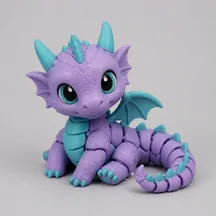
A real Sculptly output from our benchmark run — your result appears here once you upload an image.
Three steps
How the image to STL conversion runs.
Upload one image
PNG, JPG, or WEBP up to 10 MB. One subject, fully in frame, on a plain background is the most dependable input.
Generate the mesh
Most generations finish in two to four minutes, and the page reports progress while the model is being built.
Download the STL
The .glb preview is free to keep; .stl and .obj are a paid unlock on the same generation, either for this one model or for every model on your account.
Before you slice
The open-hole check is free, and it is in the flow.
After a model finishes, the same hole-detection pass our Mesh Repair tool uses runs on the result and reports how many open boundaries it found. If there are any, the generator links straight into the repair tool with your model already loaded — no re-upload, no paywall, no account for the repair itself.
Boundary edges used by only one triangle are grouped into loops and capped, with every patch shown in a distinct orange material so you can see exactly what changed. Self-intersecting geometry, flipped normals, and disconnected islands are out of scope.
Open the free GLB mesh repair tool →Format choice
Why STL and not GLB or OBJ.
STL stores triangles and nothing else — no materials, no textures, no UVs. That sounds like a downside until you open a slicer, which wants exactly that and ignores everything else anyway. Every slicer worth using reads STL, which is why it is the safe handoff format for printing. If you want the colours and PBR materials kept with the mesh, the GLB from the same generation is free; if you want plain geometry that almost any 3D application opens, OBJ shares the same paid unlock as STL, so once you have bought one you have both.
Honest by design
What an image to STL conversion cannot do.
A single image cannot see the back
Hidden surfaces are inferred, not observed. That is where open boundaries and non-manifold geometry usually come from, so treat any STL export as an editable draft rather than a print-ready promise.
Some subjects lose fidelity
Clear single subjects tend to work best. Pixel-art hard edges can blur, and detailed mechanical or vehicle surfaces can lose fidelity.
Your image is uploaded to generate
Generation runs on a server, so the image you upload here leaves your device. That is different from our five browser-only tools — the viewer, voxelizer, mesh repair, mold generator, scene composer, print cost calculator, and lithophane generator never send your file anywhere.
Frequently asked questions about image to STL
What is the difference between STL, GLB, and OBJ — which should I download?
STL carries geometry only: no colours, no materials, no UVs. That is exactly what a 3D-printing slicer wants, which is why it is the format to take to a printer. Download GLB instead if you want the PBR textures kept with the mesh for Blender, Unity, or SketchUp — that one stays free. OBJ and STL are both a paid unlock on the same generation, so picking between those two costs nothing extra once you have unlocked either.
Can I 3D print the generated STL directly?
Not as a guarantee. Single-image reconstruction cannot see hidden surfaces and can leave open holes or non-manifold geometry, so the STL is an editable draft. This page checks the result for open boundaries after generating and hands the model straight to our free GLB mesh repair tool, which caps each hole and shows every patch in a distinct orange material. It does not fix self-intersecting geometry, flipped normals, or disconnected islands — those still need manual work in a mesh editor.
How much can I convert for free?
An anonymous visitor can run one lifetime free demo per IP, with no card. After signing up, an account receives 3 credits right away — 1 generation. That is 2 free generations in total, then the plans. Paid plans start at $19/mo, or $3 for a one-time credit pack that never expires.
Can I use the STL commercially?
You may use models generated from images you own or are authorised to use. You remain responsible for rights in your source image and for how you use the output. One condition while an account has never bought anything: credit Sculptly — “Made with Sculptly” plus a link to sculptly3d.com — wherever you publish or sell it. Any purchase removes that for every model on the account, including ones made earlier. Personal use never needs it.
Is my image uploaded to a server?
Yes. Generating a 3D model runs on a server, so the image you upload on this page does leave your device. This is deliberately different from our eleven free tools — the GLB viewer, voxelizer, mesh repair, OBJ to STL converter, STL to 3MF converter, STL simplifier, mold generator, scene composer, splat viewer, print cost calculator, and lithophane generator all run entirely in your browser and have no upload endpoint at all.
What input formats and sizes are supported?
PNG, JPG, and WEBP images up to 10 MB. A clear image with a single visible subject is the most dependable input; busy backgrounds, heavy motion blur, and objects cropped at the edge of the frame are the three things that most often produce a mesh you will want to regenerate.
All three run entirely in your browser on any GLB file — not only on models made here.
Inspect a GLB → · Patch open holes → · Make a mold block →Is your picture a flat logo, a name or a sign rather than an object? AI image to 3D redraws lettering; the PNG to STL tracing tool keeps every letter exactly as drawn.
Printing on an AMS or MMU? The image to multicolor 3D print page paints the same model in 2 to 8 filament colours.
Real numbers from our pipeline
What we measured on 2,371 real generations.
Between September 4 and October 4, 2026, visitors to this site (bots, test accounts and our own runs removed) submitted 2,371 images, and 2,180 of them (91.9%) came back as a model. The GPU part took 31 seconds at the median and 46 seconds at the 90th percentile. The whole wait, from submitting the image to the model being ready, was 81 seconds at the median and 165 seconds at the 90th percentile, over 1,989 runs timed since September 8. So the two to four minutes quoted above is a cautious estimate that allows for busy hours, not the typical wait.
For printing, holes are the number that matters. Our in-browser check finished on 1,640 models since September 9, and 1,522 of them (92.8%) had no open boundary loops. That is not yet a solid a slicer accepts: loose fragments and non-manifold edges are separate problems, which is why the paid STL export tries to rebuild the mesh as one closed piece, and refuses rather than move your shape more than 1%. On the 156 models rebuilt since September 23, the surface moved a median 0.06% from the original shape. For why a single photo leaves holes at all, read why single-image reconstruction makes holes, or compare this route with photogrammetry and CAD in the guide to making a 3D model from images.
Comparing tools before you print? Meshy vs Tripo vs Sculptly: what a 3D model costs and what you can print.